Post Taxes for Exempted Accounts
Stay is enhanced to improve the tracking of tax-exempt amounts. Now, when a tax exemption is applied, the tax amount is first posted to the appropriate tax-exempt account before being adjusted to $0.00.
Previously, tax amounts were not posted to tax-exempt accounts, making it difficult for users to track the value of exempted taxes.
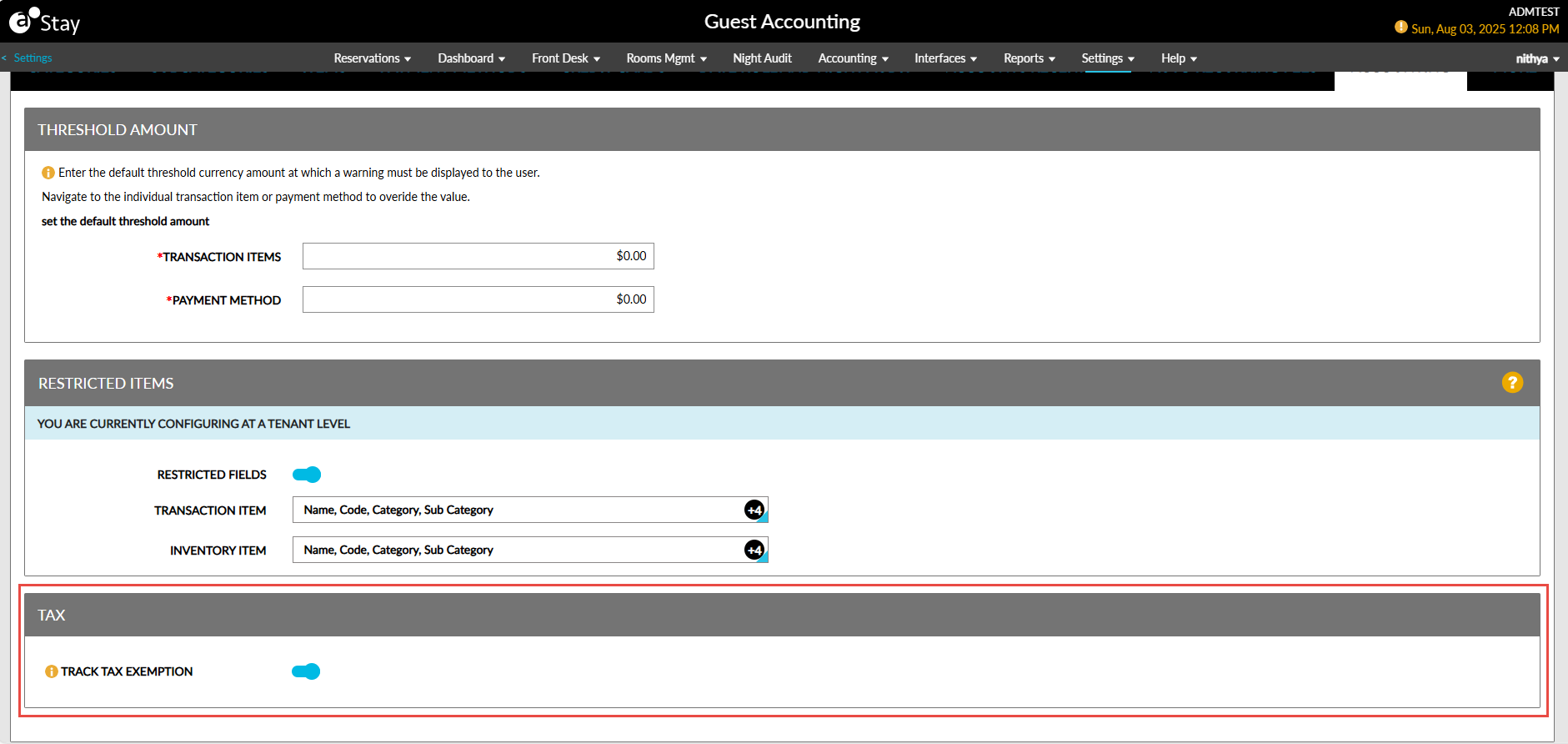
To support this enhancement, a new section, Tax, has been added to the Accounting tab of the Guest Accounting screen. A new flag, Track Tax Exemption, has been added to this section. This flag supports the following functionality:
-
When enabled, the tax amount will be posted to the tax-exempt accounts initially and then adjusted to $0.00.
-
When disabled, the tax amount will be posted directly as $0.00 to the tax-exempt accounts. This flag is disabled by default.
Post Tax Amount to Reservations and Groups
When the Track Tax Exemption flag is enabled, the tax amount will be posted to the folio of tax-exempted reservations and groups initially and then adjusted to $0.00.
A new record is created in the folios to display the following details:
-
Original charge and tax amounts
-
Exempted value for each tax class
-
Selected reason for exemption
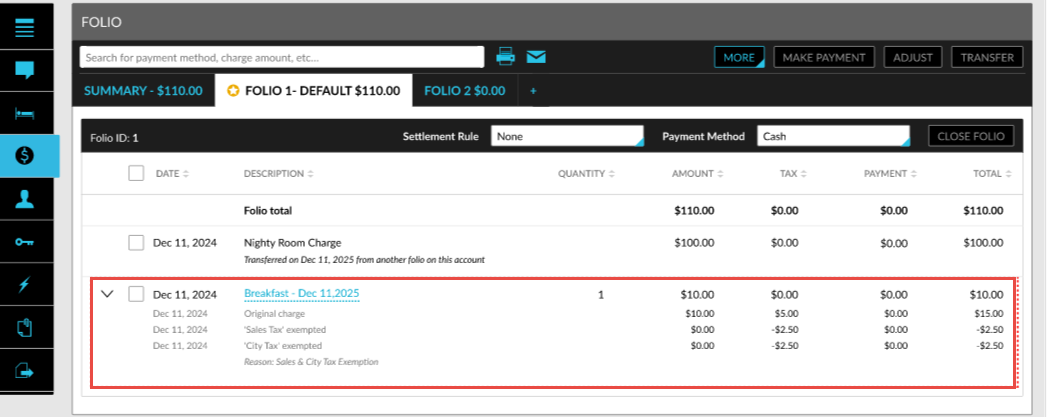
The exempted tax amount is also displayed when the folios are printed and when a posted charge is adjusted or corrected.
Post Tax Amount to A/R Accounts
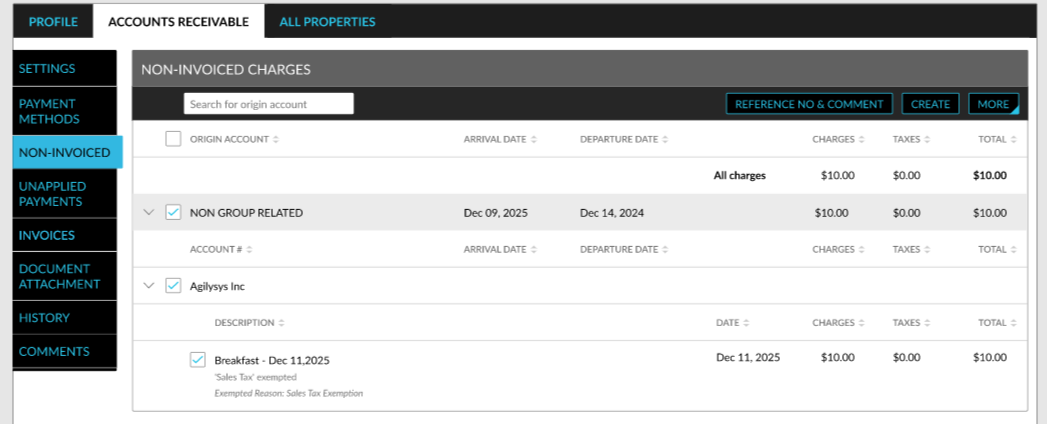
For tax-exempted A/R accounts, the tax amount is posted to the Non-Invoiced Charges section initially and then adjusted to $0.00. A new record is created in the folios to display the following details:
-
The exempt reason selected. The reason selected for a tax class in the Tax Exempt Settings pop-up screen (A/R account ➜ Summary ➜ Tax Exempt) is displayed.
Tax exemption is also applied when a charge is adjusted or corrected. Only the latest tax exemption entry is displayed in the Non-Invoiced Charges section when the charge is adjusted or corrected.
Tax Exemptions Report (Dynamic)
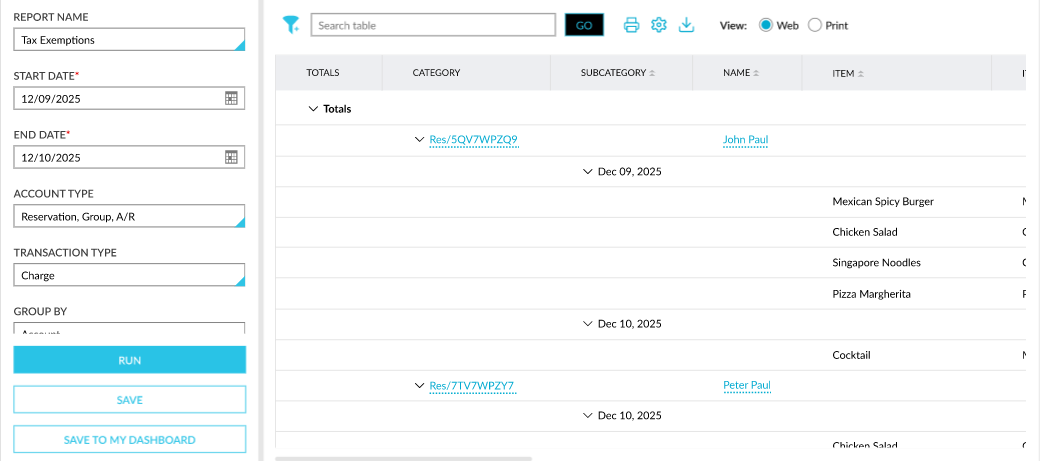
A new Dynamic report, Tax Exemptions, has been added to the Accounting section of the Reporting screen (Reports ➜ Dynamic Reports ➜ Accounting) that allows users to track the tax amount exempted from accounts.
This report can be generated for the following report generation parameters:
|
Field |
Description |
|---|---|
|
Report Name |
Tax Exemptions. |
|
Start Date |
The start date from which the report must be generated. By default, the current property date is displayed. This is a mandatory field that allows users to select any date in the past up to the current property date. Future dates cannot be selected. |
|
End Date |
The end date up to which the report must be generated. By default, the current property date is displayed. The duration between the start and end dates can be a maximum of one month. This is a mandatory field that allows users to select any date in the past up to the current property date. Future dates cannot be selected. |
|
Account Type |
This is a multi-select drop-down list that allows users to select from the following account types to be included in the report:
|
|
Transaction Type |
This is a multi-select drop-down list that allows users to select from the following transaction types to be included in the report:
|
|
Group By |
This is a single-select drop-down list that allows users to select from the following options based on which the records must be grouped:
|
|
Include Item Details |
By default, the Item and Item Code columns are not displayed in the report. When this checkbox is selected, the item details are displayed in the mentioned columns. |
Videos